#517 – Reporting, Now Live
Friday Ship #517 | November 13th, 2026
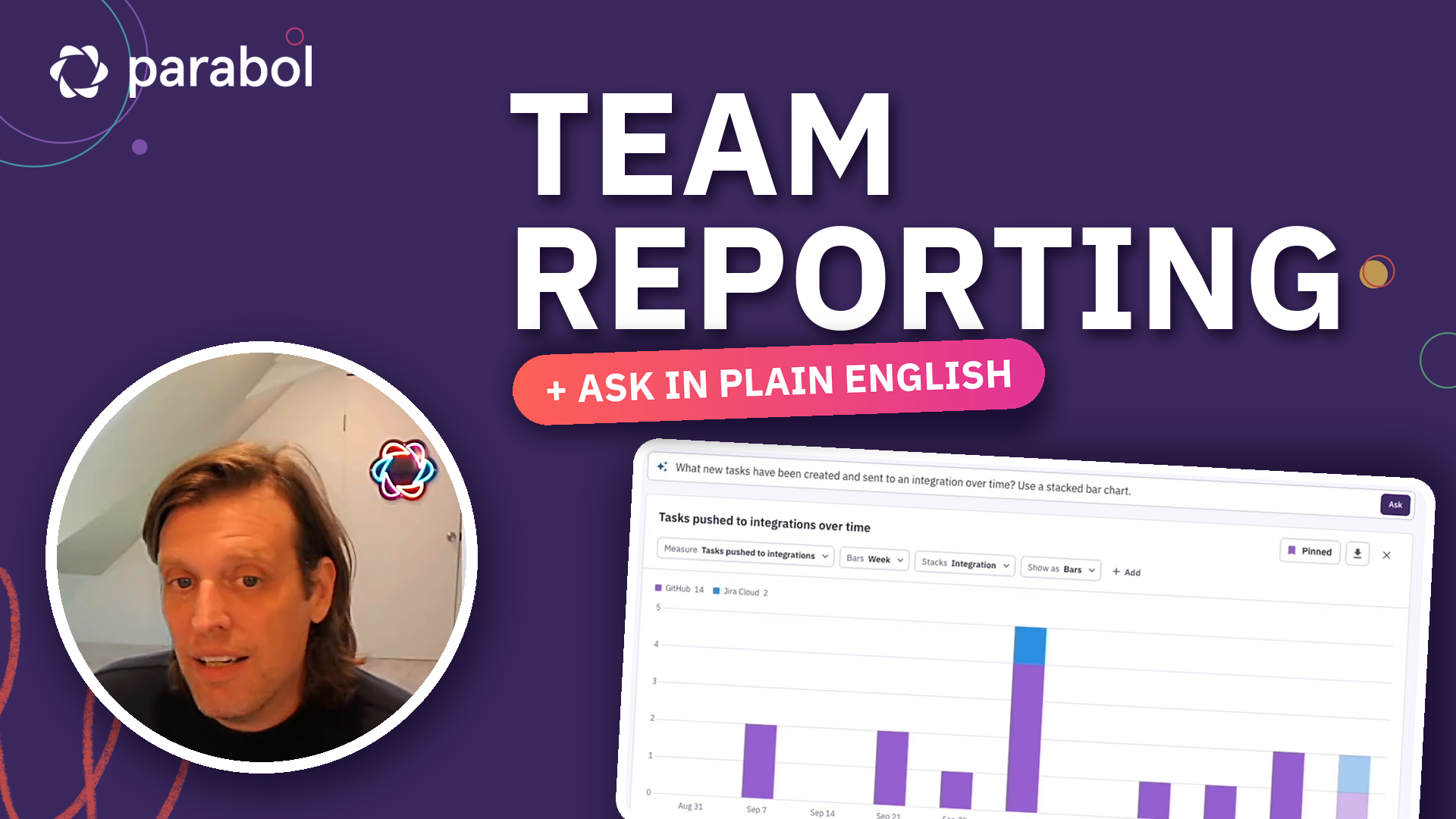
This week we turned on Reports for every organization in Parabol.
When we shipped Team Health in Friday Ship #510, we promised leaders a way to see how all of their teams were doing in one place. Reports is that place, and a good deal more. Open it from the left nav, and you’ll find a few headline numbers about how your organization uses Parabol, a handful of example reports, and a box where you can simply ask a question.
I recorded a short walkthrough:
Just ask
Type something like “What new tasks have been created and sent to an integration over time? Use a stacked bar chart,” and a moment later, there it is. Change the time range, swap the chart, or pin it so it’s waiting for you the next time you open the page.
In Friday Ship #512 I wrote about how AI agents are replacing traditional BI dashboards, coding up a custom report in an instant. We wanted that speed, but we didn’t want an AI making up numbers about your teams. So in Reports, the AI only picks what to measure, how to slice it and how to show it. Parabol checks that request, limits it to the teams you’re allowed to see, and calculates every number from your own Parabol data.
Shaped with customers
Before we wrote much code, we put designs in front of customers (Friday Ship #513). There are two requests that shaped this release worth sharing more about. The first was to roll teams up into departments, business units or regions. That became Team Structure. We first sketched it as a hierarchy, then switched to tags (Friday Ship #514), so you can look at “Engineering in EMEA” without filing every team under a region by hand. The second was to show the impact Parabol has, like how many tasks come out of discussions and whether they get done. Parabol now records when a task is done, so that answer gets richer every week.
Then we spent a morning trying to break it on our staging server (Friday Ship #515). Most questions went well. But some quietly got the closest report instead of an honest “I can’t answer that yet.” Now, when Reports can’t answer a question, it says so and suggests one it can. And every report the AI builds has a 🙂 and a 🙁 under it, so you can tell us how it did.
Team Health, at a glance
My favorite is Health Score by Team. It lays every team’s Team Health results out in a single heatmap and flags the cells that need attention. It looks at the tone of each category’s AI summary, how far apart people’s answers are and how many people left a comment, and it never flags more than one cell in five, so a flag means something. Click a flagged cell to see the question, the trend, the spread of answers and the comments behind it. A check that fewer than three people answered stays hidden, the same anonymity floor the meeting itself enforces.
If you’re an org admin, open Reports and ask it something. And if it can’t answer a question you wish it could, that’s exactly what the 🙁 is for.
We’re looking forward to how you use this feature!
Metrics
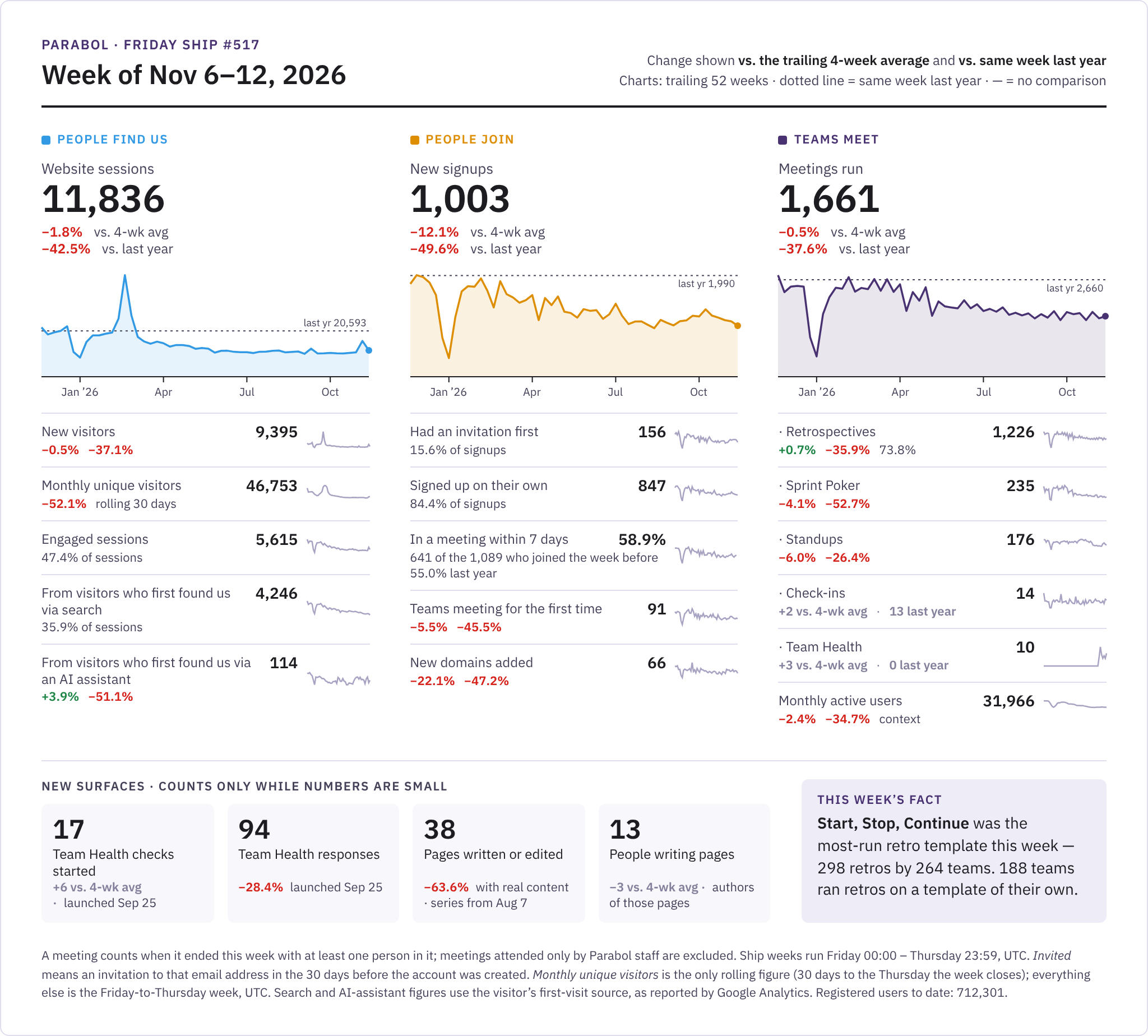
Teams ran 1,661 meetings this week, right in line with the four-week average (−0.5%), and website sessions (11,836) held close to theirs too (−1.8%), while new signups (1,003) slipped 12.1% below theirs. The best news is what happens after people join: 58.9% of the people who signed up the week before ran a meeting within seven days, ahead of 55.0% at this time last year. Team Health keeps growing, with 17 checks started, six more than the four-week average. And Start, Stop, Continue was once again the most-run retro template (298 retros by 264 teams), while 188 teams ran retros on a template of their own.
This week we…
…added a ClickUp integration. People have asked for ClickUp for a long time. You can send Parabol tasks to a ClickUp list, pull ClickUp tasks into Sprint Poker and send estimates back as Sprint Points or a custom field, and see your assigned ClickUp tasks in retros and standups. It was also our first real test of the new integration refactoring kit.
…made it easier to send a task where it belongs. Every task card now shows where it can go on the surface of the card. If your team hasn’t connected a tool yet, the card suggests the ones your organization already uses. The send menu opens instantly and tells you when a tool has failed or needs reconnecting. And you can now connect a tool without leaving the menu: it stays open while you sign in, and if the sign-in fails or your browser blocks the popup, it says so and offers “Try again.”
…made it harder to leave a discussion without a next step. The discussion box now has Comment and Task tabs. Switch to Task, type a line, press Enter, and it’s a task. An All / Tasks filter shows just the tasks on a topic. If people have left three comments and nobody has made a task, the Tasks counter turns gold to nudge you.
…made Suggested Groups better and faster to use. Facilitators get an “Accept all” button that forms every suggested group in one click, and Undo puts the cards back exactly as they were. Suggestions now look at one column at a time. After each retro, Parabol AI also writes a short briefing from your team’s last six months of retros and uses it the next time it groups.
…let you change a standup’s template mid-meeting. It’s in the ⋯ menu. Parabol tells you how many people have started answering before it clears their answers, and replies and tasks stay put. Recurring meetings get a “use for future meetings” box, and the next recurring retro now starts from the series template instead of copying the last one.
…shipped callouts in Pages. Type /callout, pick one of six tones, and add a title or emoji if you like. Callouts come through in Markdown and in Confluence exports.
…put Beetee to work. Last week we said we’d point Beetee, our bug-fixing AI agent, at the error reports you send us. Feedback from the error screen now arrives with the crash attached (v15.19.0). Beetee got 25 fixes merged since last Friday. Archived Slack channels stop getting notifications, a Jira site that’s been removed no longer throws errors, and permanently deleted pages stay deleted.
…made Parabol faster and steadier. The web server starts in a third of the time and uses about 40% less memory at boot. Meetings start in fewer round trips. A hidden tab pauses its connection and catches up when you come back. During a deploy, open meetings and pages move to another server instead of dropping. When we measured reconnects on the server, 98% finished in under a second. File uploads now retry when storage hiccups instead of failing.
…fixed a stack of smaller things. Daily notification summary emails are sending again. SCIM can replace a team’s whole member list without losing the team, and a group with more than 100 members now gets an error that says why. Promoting a team lead leaves exactly one lead. OAuth access tokens can only do what they were granted. When an action fails, Parabol now shows you the error instead of failing quietly. The drawer on phones fits the screen.
Next week we’ll…
…kick off Shape Up Cycle 17.
…watch how teams use Reports now that every organization has it.
…let you turn on anonymous reflections for a whole recurring retro series, so you set it once. It’s in review.
…let you turn a block into another type from the text menu in Pages. Also in review.
…start moving integrations from teams to people. Connect Jira or ClickUp once and use it on every team in your organization. If you’re in more than one organization, you pick which account goes with which.

Jordan Husney
Jordan is Parabol’s CEO and Head of Product. He was previously a Director at Undercurrent, where he advised C-Suite teams of Fortune 100 organizations on the future of work. Jordan has an engineering background, holding several patents in distributed systems and wireless technology. Jordan lives in Minneapolis, MN.